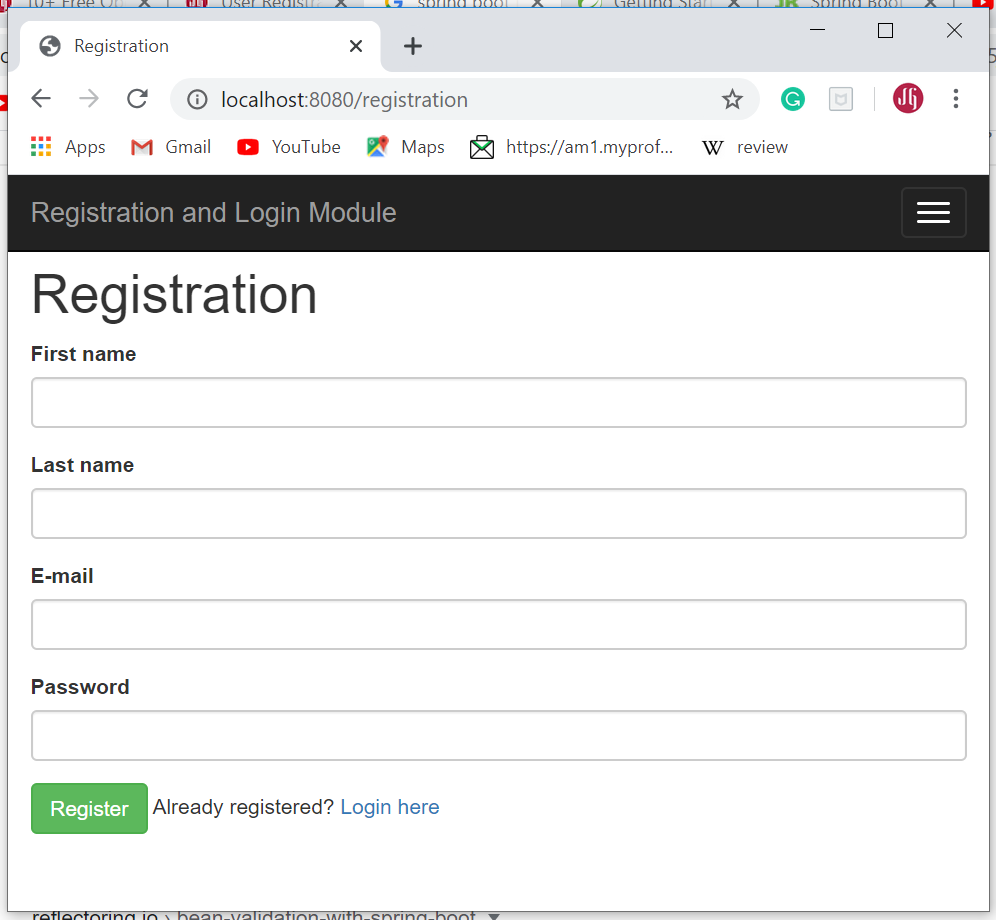
Spring Security Tutorial - Registration, Login, and Logout
In this tutorial, we will learn how to develop registration, login, and logout features using Spring Boot, Spring Security, Spring Data JPA, Thymeleaf, and the MySQL database.
Learn and master in Spring Boot at Spring Boot Tutorial.
Learn and master in Spring Security at Spring Security Tutorial.
What you’ll learn?
- Learn how to build a Spring MVC web application using Spring Boot
- Learn how to configure Spring Security in the Spring Boot project
- How to develop end-to-end Registration implementation
- How to develop custom login feature implementation
- Spring Security authentication with a database-backed UserDetailsService
- Spring Security logout feature
- Learn how to create JPA entities - User and Role (Many-to-Many Relationship)
- Configure MySQL database in Spring Boot project
- How to develop Registration and Login forms using Thymeleaf
- How to integrate Spring Security in Thymeleaf
- How to use Thymeleaf attributes to display security details like principal (user email), roles, etc.
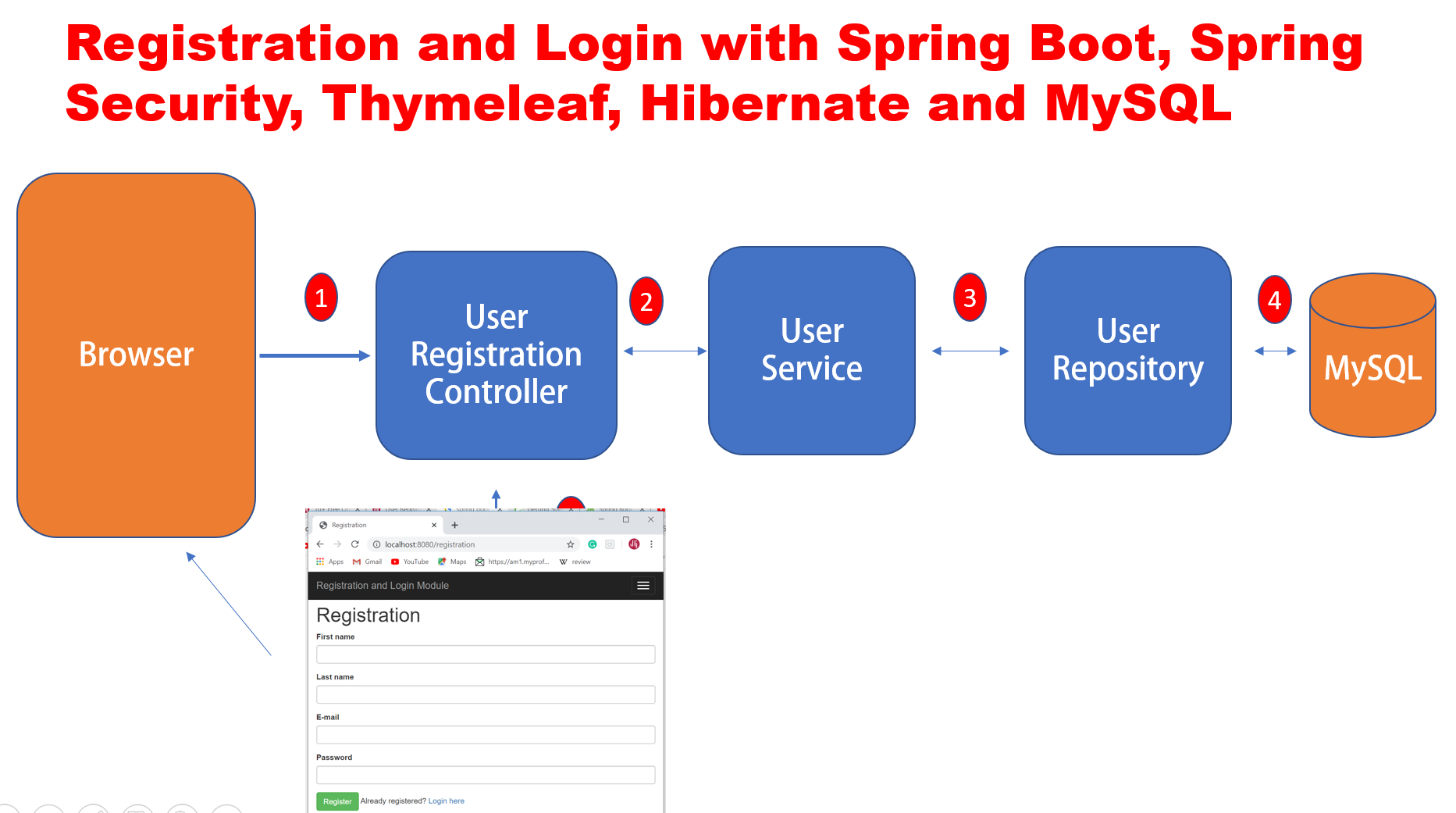
Application Flow
We are going to develop a Spring MVC web application and here is the application flow:
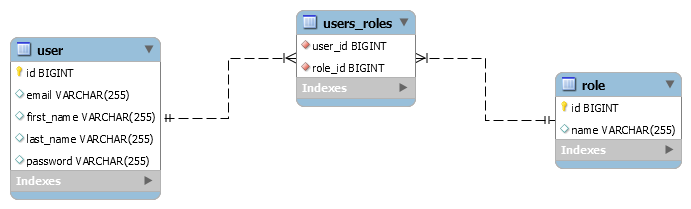
Database Design (ER Diagram)
We create User and Role tables with a
many-to-many relationship between
them. One user can have multiple roles, and one role can be assigned to multiple users.
Tools and Technologies Used
- Spring Boot 2.3+
- Spring Framework 5.2.6
- Spring Data JPA (Hibernate)
- Thymeleaf
- Eclipse STS
- Maven
- Java 8
1. Create Spring Boot Project
There are many ways to create a Spring Boot application. You can refer to the following articles:
- Create Spring Boot Project With Spring Initializer
- Create Spring Boot Project in Spring Tool Suite (STS)
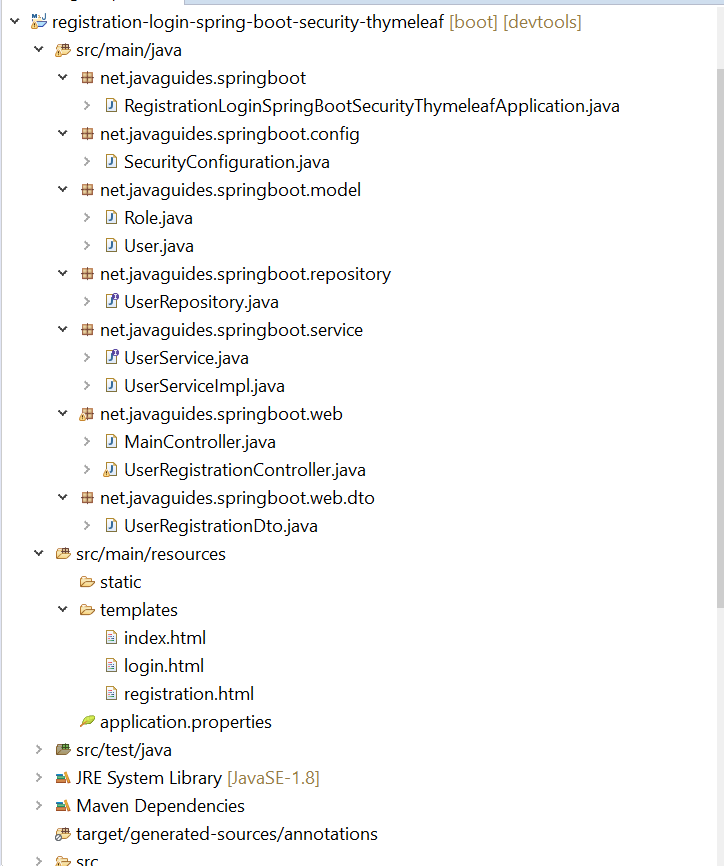
2. Project Structure
3. Maven Dependencies
Add the following dependencies to your pom.xml file:
<?xml version="1.0" encoding="UTF-8"?>
<project xmlns="http://maven.apache.org/POM/4.0.0"
         xmlns:xsi="http://www.w3.org/2001/XMLSchema-instance"
         xsi:schemaLocation="http://maven.apache.org/POM/4.0.0 https://maven.apache.org/xsd/maven-4.0.0.xsd">
    <modelVersion>4.0.0
    <parent>
        <groupId>org.springframework.boot
        <artifactId>spring-boot-starter-parent
        <version>2.3.0.RELEASE
    </parent>
    <groupId>net.javaguides
    <artifactId>registration-login-spring-boot-security-thymeleaf
    <version>0.0.1-SNAPSHOT
    <dependencies>
        <!-- Spring Data JPA, Spring Security, Thymeleaf, etc. -->
    </dependencies>
</project>
4. MySQL Database Configuration
Create a database with the name "demo" in the MySQL database server.
We’ll need to configure MySQL database URL, username, and password so that Spring can establish a connection with the database on startup.
Open application.properties and add following MySQL database configuration:
# Spring DATASOURCE
spring.datasource.url = jdbc:mysql://localhost:3306/demo?useSSL=false
spring.datasource.username = root
spring.datasource.password = root

# Hibernate Properties
spring.jpa.properties.hibernate.dialect = org.hibernate.dialect.MySQL5InnoDBDialect
spring.jpa.hibernate.ddl-auto = update
logging.level.org.hibernate.SQL=DEBUG
logging.level.org.hibernate.type=TRACE
Make sure that you change the spring.datasource.username and spring.datasource.password properties as per
your MySQL installation.
The spring.jpa.hibernate.ddl-auto = update property makes sure that the
database tables and the domain
models in your application are in sync. Whenever you change the domain model, hibernate will automatically
update the mapped table in the database when you restart the application.
I have also specified the log levels for hibernate so that we can debug the SQL queries executed by hibernate.
5. Model Layer - Create JPA Entities
User
Create a new package called "net.javaguides.springboot.model", within this package create a User class and
add the following content:
package net.javaguides.springboot.model;

import java.util.Collection;

import javax.persistence.CascadeType;
import javax.persistence.Column;
import javax.persistence.Entity;
import javax.persistence.FetchType;
import javax.persistence.GeneratedValue;
import javax.persistence.GenerationType;
import javax.persistence.Id;
import javax.persistence.JoinTable;
import javax.persistence.ManyToMany;
import javax.persistence.Table;
import javax.persistence.UniqueConstraint;
import javax.persistence.JoinColumn;

@Entity
@Table(name = "user", uniqueConstraints = @UniqueConstraint(columnNames = "email"))
public class User {

    @Id
    @GeneratedValue(strategy = GenerationType.IDENTITY)
    private Long id;

    @Column(name = "first_name")
    private String firstName;

    @Column(name = "last_name")
    private String lastName;

    private String email;

    private String password;

    @ManyToMany(fetch = FetchType.EAGER, cascade = CascadeType.ALL)
    @JoinTable(
        name = "users_roles",
        joinColumns = @JoinColumn(
            name = "user_id", referencedColumnName = "id"),
        inverseJoinColumns = @JoinColumn(
            name = "role_id", referencedColumnName = "id"))

    private Collection < Role > roles;

    public User() {

    }

    public User(String firstName, String lastName, String email, String password, Collection < Role > roles) {
        super();
        this.firstName = firstName;
        this.lastName = lastName;
        this.email = email;
        this.password = password;
        this.roles = roles;
    }
    public Long getId() {
        return id;
    }
    public void setId(Long id) {
        this.id = id;
    }
    public String getFirstName() {
        return firstName;
    }
    public void setFirstName(String firstName) {
        this.firstName = firstName;
    }
    public String getLastName() {
        return lastName;
    }
    public void setLastName(String lastName) {
        this.lastName = lastName;
    }
    public String getEmail() {
        return email;
    }
    public void setEmail(String email) {
        this.email = email;
    }
    public String getPassword() {
        return password;
    }
    public void setPassword(String password) {
        this.password = password;
    }
    public Collection < Role > getRoles() {
        return roles;
    }
    public void setRoles(Collection < Role > roles) {
        this.roles = roles;
    }
}
Role
Within "net.javaguides.springboot.model" package create a Role class and add
the following content:
package net.javaguides.springboot.model;

import javax.persistence.Entity;
import javax.persistence.GeneratedValue;
import javax.persistence.GenerationType;
import javax.persistence.Id;
import javax.persistence.Table;

@Entity
@Table(name = "role")
public class Role {

    @Id
    @GeneratedValue(strategy = GenerationType.IDENTITY)
    private Long id;
    private String name;

    public Role() {

    }

    public Role(String name) {
        super();
        this.name = name;
    }

    public Long getId() {
        return id;
    }
    public void setId(Long id) {
        this.id = id;
    }
    public String getName() {
        return name;
    }
    public void setName(String name) {
        this.name = name;
    }
}
6. Spring Data JPA Repository
Create a new package called "net.javaguides.springboot.repository", within this package create
UserRepository interface and add the following content:
package net.javaguides.springboot.repository;

import org.springframework.data.jpa.repository.JpaRepository;
import net.javaguides.springboot.model.User;

public interface UserRepository extends JpaRepository {
    User findByEmail(String email);
}
7. DTO - UserRegistrationDto
Let's create a new package called "net.javaguides.springboot.web.dto", within this package create a
UserRegistrationDto class to transfer data from server to client:
package net.javaguides.springboot.web.dto;

public class UserRegistrationDto {
    private String firstName;
    private String lastName;
    private String email;
    private String password;

    public UserRegistrationDto() {

    }

    public UserRegistrationDto(String firstName, String lastName, String email, String password) {
        super();
        this.firstName = firstName;
        this.lastName = lastName;
        this.email = email;
        this.password = password;
    }

    public String getFirstName() {
        return firstName;
    }
    public void setFirstName(String firstName) {
        this.firstName = firstName;
    }
    public String getLastName() {
        return lastName;
    }
    public void setLastName(String lastName) {
        this.lastName = lastName;
    }
    public String getEmail() {
        return email;
    }
    public void setEmail(String email) {
        this.email = email;
    }
    public String getPassword() {
        return password;
    }
    public void setPassword(String password) {
        this.password = password;
    }
}
8. Service Layer
UserService
Create a new package called "net.javaguides.springboot.service", within this package create UserService
interface and add the following content:
package net.javaguides.springboot.service;

import org.springframework.security.core.userdetails.UserDetailsService;

import net.javaguides.springboot.model.User;
import net.javaguides.springboot.web.dto.UserRegistrationDto;

public interface UserService extends UserDetailsService{
 User save(UserRegistrationDto registrationDto);
}
UserServiceImpl
Within "net.javaguides.springboot.service" package create a UserServiceImpl class and add the following
content:
package net.javaguides.springboot.service;

import java.util.Arrays;
import java.util.Collection;
import java.util.stream.Collectors;

import org.springframework.beans.factory.annotation.Autowired;
import org.springframework.security.core.GrantedAuthority;
import org.springframework.security.core.authority.SimpleGrantedAuthority;
import org.springframework.security.core.userdetails.UserDetails;
import org.springframework.security.core.userdetails.UsernameNotFoundException;
import org.springframework.security.crypto.bcrypt.BCryptPasswordEncoder;
import org.springframework.stereotype.Service;

import net.javaguides.springboot.model.Role;
import net.javaguides.springboot.model.User;
import net.javaguides.springboot.repository.UserRepository;
import net.javaguides.springboot.web.dto.UserRegistrationDto;

@Service
public class UserServiceImpl implements UserService {

    private UserRepository userRepository;

    @Autowired
    private BCryptPasswordEncoder passwordEncoder;

    public UserServiceImpl(UserRepository userRepository) {
        super();
        this.userRepository = userRepository;
    }

    @Override
    public User save(UserRegistrationDto registrationDto) {
        User user = new User(registrationDto.getFirstName(),
            registrationDto.getLastName(), registrationDto.getEmail(),
            passwordEncoder.encode(registrationDto.getPassword()), Arrays.asList(new Role("ROLE_USER")));

        return userRepository.save(user);
    }

    @Override
    public UserDetails loadUserByUsername(String username) throws UsernameNotFoundException {

        User user = userRepository.findByEmail(username);
        if (user == null) {
            throw new UsernameNotFoundException("Invalid username or password.");
        }
        return new org.springframework.security.core.userdetails.User(user.getEmail(), user.getPassword(), mapRolesToAuthorities(user.getRoles()));
    }

    private Collection << ? extends GrantedAuthority > mapRolesToAuthorities(Collection < Role > roles) {
        return roles.stream().map(role - > new SimpleGrantedAuthority(role.getName())).collect(Collectors.toList());
    }
}
9. Spring Security Configuration
Let's create a new package called "net.javaguides.springboot.config", within this package create a
SecurityConfiguration class and add following content:
package net.javaguides.springboot.config;

import org.springframework.beans.factory.annotation.Autowired;
import org.springframework.context.annotation.Bean;
import org.springframework.context.annotation.Configuration;
import org.springframework.security.authentication.dao.DaoAuthenticationProvider;
import org.springframework.security.config.annotation.authentication.builders.AuthenticationManagerBuilder;
import org.springframework.security.config.annotation.web.builders.HttpSecurity;
import org.springframework.security.config.annotation.web.configuration.EnableWebSecurity;
import org.springframework.security.config.annotation.web.configuration.WebSecurityConfigurerAdapter;
import org.springframework.security.crypto.bcrypt.BCryptPasswordEncoder;
import org.springframework.security.web.util.matcher.AntPathRequestMatcher;

import net.javaguides.springboot.service.UserService;

@Configuration
@EnableWebSecurity
public class SecurityConfiguration extends WebSecurityConfigurerAdapter {

    @Autowired
    private UserService userService;

    @Bean
    public BCryptPasswordEncoder passwordEncoder() {
        return new BCryptPasswordEncoder();
    }

    @Override
    protected void configure(HttpSecurity http) throws Exception {
        http.authorizeRequests().antMatchers(
                "/registration**",
                "/js/**",
                "/css/**",
                "/img/**").permitAll()
            .anyRequest().authenticated()
            .and()
            .formLogin()
            .loginPage("/login")
            .permitAll()
            .and()
            .logout()
            .invalidateHttpSession(true)
            .clearAuthentication(true)
            .logoutRequestMatcher(new AntPathRequestMatcher("/logout"))
            .logoutSuccessUrl("/login?logout")
            .permitAll();
    }

    @Bean
    public DaoAuthenticationProvider authenticationProvider() {
        DaoAuthenticationProvider auth = new DaoAuthenticationProvider();
        auth.setUserDetailsService(userService);
        auth.setPasswordEncoder(passwordEncoder());
        return auth;
    }

    @Override
    protected void configure(AuthenticationManagerBuilder auth) throws Exception {
        auth.authenticationProvider(authenticationProvider());
    }
}
UserRegistrationController
Let's create a UserRegistrationController class within
"net.javaguides.springboot.web" package and add
following content:
package net.javaguides.springboot.web;

import org.springframework.stereotype.Controller;
import org.springframework.ui.Model;
import org.springframework.web.bind.annotation.GetMapping;
import org.springframework.web.bind.annotation.ModelAttribute;
import org.springframework.web.bind.annotation.PostMapping;
import org.springframework.web.bind.annotation.RequestMapping;

import net.javaguides.springboot.service.UserService;
import net.javaguides.springboot.web.dto.UserRegistrationDto;

@Controller
@RequestMapping("/registration")
public class UserRegistrationController {

    private UserService userService;

    public UserRegistrationController(UserService userService) {
        super();
        this.userService = userService;
    }

    @ModelAttribute("user")
    public UserRegistrationDto userRegistrationDto() {
        return new UserRegistrationDto();
    }

    @GetMapping
    public String showRegistrationForm() {
        return "registration";
    }

    @PostMapping
    public String registerUserAccount(@ModelAttribute("user") UserRegistrationDto registrationDto) {
        userService.save(registrationDto);
        return "redirect:/registration?success";
    }
}
MainController
Let's create a MainController class within
"net.javaguides.springboot.web" package and add following
content:
package net.javaguides.springboot.web;

import org.springframework.stereotype.Controller;
import org.springframework.web.bind.annotation.GetMapping;

@Controller
public class MainController {

    @GetMapping("/login")
    public String login() {
        return "login";
    }

    @GetMapping("/")
    public String home() {
        return "index";
    }
}
10. Thymeleaf Templates
By default, Spring Boot looks for our templates in src/main/resources/templates. We can put our templates
there and organize them in sub-directories and have no issues.
Let's create Thymeleaf templates under "src/main/resources/templates" folder.
Registration Page - registration.html
<!DOCTYPE html>
<html>
<head>
<meta charset="ISO-8859-1">
<title>Registration</title>
<link rel="stylesheet"
 href="https://maxcdn.bootstrapcdn.com/bootstrap/3.3.7/css/bootstrap.min.css"
 integrity="sha384-BVYiiSIFeK1dGmJRAkycuHAHRg32OmUcww7on3RYdg4Va+PmSTsz/K68vbdEjh4u"
 crossorigin="anonymous">
</head>
<body>

 <!-- create navigation bar ( header) -->
 <nav class="navbar navbar-inverse navbar-fixed-top">
  <div class="container">
   <div class="navbar-header">
    <button type="button" class="navbar-toggle collapsed"
     data-toggle="collapse" data-target="#navbar" aria-expanded="false"
     aria-controls="navbar">
     <span class="sr-only">Toggle navigation</span> <span
      class="icon-bar"></span> <span class="icon-bar"></span> <span
      class="icon-bar"></span>
    </button>
    <a class="navbar-brand" href="#" th:href="@{/}">Registration and
     Login Module</a>
   </div>
  </div>
 </nav>

<br>
<br>
 <!-- Create HTML registration form -->
 <div class="container">
  <div class="row">
   <div class="col-md-6 col-md-offset-3">

    <!-- success message -->
    <div th:if="${param.success}">
     <div class="alert alert-info">You've successfully registered
      to our awesome app!</div>
    </div>

    <h1>Registration</h1>

    <form th:action="@{/registration}" method="post" th:object="${user}">
     <div class="form-group">
      <label class="control-label" for="firstName"> First Name </label>
      <input id="firstName" class="form-control" th:field="*{firstName}"
       required autofocus="autofocus" />
     </div>

     <div class="form-group">
      <label class="control-label" for="lastName"> Last Name </label> <input
       id="lastName" class="form-control" th:field="*{lastName}"
       required autofocus="autofocus" />
     </div>

     <div class="form-group">
      <label class="control-label" for="email"> Email </label> <input
       id="email" class="form-control" th:field="*{email}" required
       autofocus="autofocus" />
     </div>

     <div class="form-group">
      <label class="control-label" for="password"> Password </label> <input
       id="password" class="form-control" type="password"
       th:field="*{password}" required autofocus="autofocus" />
     </div>

     <div class="form-group">
      <button type="submit" class="btn btn-success">Register</button>
      <span>Already registered? <a href="/" th:href="@{/login}">Login
        here</a></span>
     </div>
    </form>
   </div>
  </div>
 </div>
</body>
</html>
Login Page - login.html
<!DOCTYPE html>
<html>
<head>
<meta charset="ISO-8859-1">
<title>Registration</title>
<link rel="stylesheet"
 href="https://maxcdn.bootstrapcdn.com/bootstrap/3.3.7/css/bootstrap.min.css"
 integrity="sha384-BVYiiSIFeK1dGmJRAkycuHAHRg32OmUcww7on3RYdg4Va+PmSTsz/K68vbdEjh4u"
 crossorigin="anonymous">
</head>
<body>

 <!-- create navigation bar ( header) -->
 <nav class="navbar navbar-inverse navbar-fixed-top">
  <div class="container">
   <div class="navbar-header">
    <button type="button" class="navbar-toggle collapsed"
     data-toggle="collapse" data-target="#navbar" aria-expanded="false"
     aria-controls="navbar">
     <span class="sr-only">Toggle navigation</span> <span
      class="icon-bar"></span> <span class="icon-bar"></span> <span
      class="icon-bar"></span>
    </button>
    <a class="navbar-brand" href="#" th:href="@{/}">Registration and
     Login Module</a>
   </div>
  </div>
 </nav>

<br>
<br>
 <!-- Create HTML registration form -->
 <div class="container">
  <div class="row">
   <div class="col-md-6 col-md-offset-3">

    <!-- success message -->
    <div th:if="${param.success}">
     <div class="alert alert-info">You've successfully registered
      to our awesome app!</div>
    </div>

    <h1>Registration</h1>

    <form th:action="@{/registration}" method="post" th:object="${user}">
     <div class="form-group">
      <label class="control-label" for="firstName"> First Name </label>
      <input id="firstName" class="form-control" th:field="*{firstName}"
       required autofocus="autofocus" />
     </div>

     <div class="form-group">
      <label class="control-label" for="lastName"> Last Name </label> <input
       id="lastName" class="form-control" th:field="*{lastName}"
       required autofocus="autofocus" />
     </div>

     <div class="form-group">
      <label class="control-label" for="email"> Email </label> <input
       id="email" class="form-control" th:field="*{email}" required
       autofocus="autofocus" />
     </div>

     <div class="form-group">
      <label class="control-label" for="password"> Password </label> <input
       id="password" class="form-control" type="password"
       th:field="*{password}" required autofocus="autofocus" />
     </div>

     <div class="form-group">
      <button type="submit" class="btn btn-success">Register</button>
      <span>Already registered? <a href="/" th:href="@{/login}">Login
        here</a></span>
     </div>
    </form>
   </div>
  </div>
 </div>
</body>
</html>
Home Page - index.html
<!DOCTYPE html>
<html xmlns:th="http://www.thymeleaf.org"
 xmlns:sec="http://www.thymeleaf.org/thymeleaf-extras-springsecurity3">
<head>
<meta charset="ISO-8859-1">
<title>Registration and Login App</title>

<link rel="stylesheet"
 href="https://maxcdn.bootstrapcdn.com/bootstrap/3.3.7/css/bootstrap.min.css"
 integrity="sha384-BVYiiSIFeK1dGmJRAkycuHAHRg32OmUcww7on3RYdg4Va+PmSTsz/K68vbdEjh4u"
 crossorigin="anonymous">

</head>
<body>
 <!-- create navigation bar ( header) -->
 <nav class="navbar navbar-inverse navbar-fixed-top">
  <div class="container">
   <div class="navbar-header">
    <button type="button" class="navbar-toggle collapsed"
     data-toggle="collapse" data-target="#navbar" aria-expanded="false"
     aria-controls="navbar">
     <span class="sr-only">Toggle navigation</span> <span
      class="icon-bar"></span> <span class="icon-bar"></span> <span
      class="icon-bar"></span>
    </button>
    <a class="navbar-brand" href="#" th:href="@{/}">Registration and
     Login Module</a>
   </div>
   <div id="navbar" class="collapse navbar-collapse">
    <ul class="nav navbar-nav">
     <li sec:authorize="isAuthenticated()"><a th:href="@{/logout}">Logout</a></li>
    </ul>
   </div>
  </div>
 </nav>

 <br>
 <br>

 <div class="container">
  <h1>Registration and Login with Spring Boot, Spring Security,
   Thymeleaf, Hibernate and MySQL</h1>
  Welcome <span sec:authentication="principal.username"> User</span>
 </div>
</body>
</html>
11. Run Spring application
Run spring boot application with the following command:
$ mvn spring-boot:run12. Demo
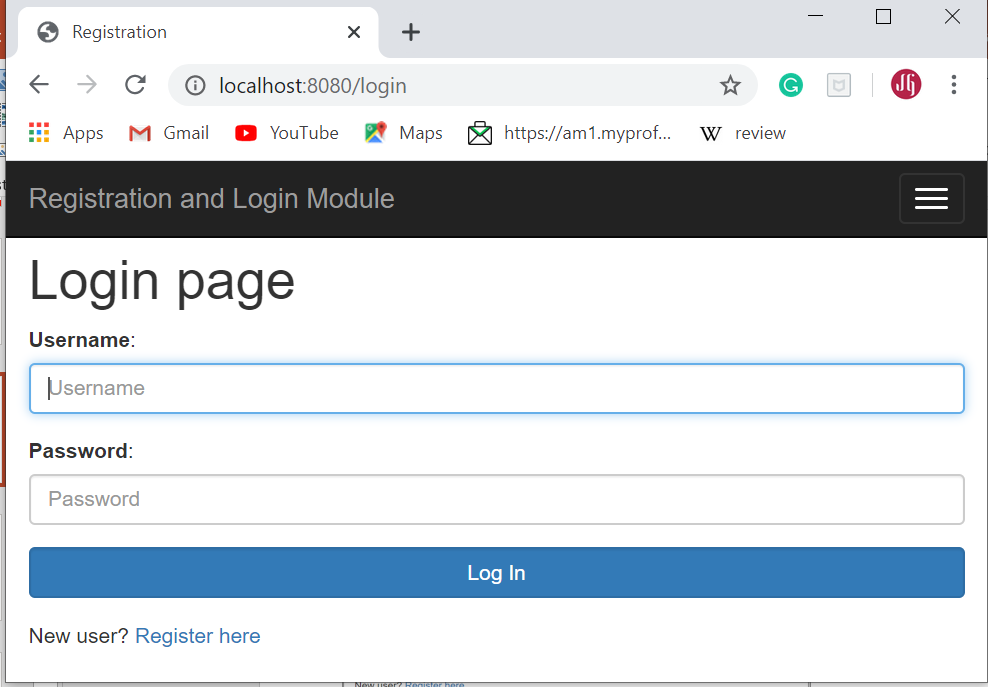
Use the "http://localhost:8080/login" link to access the application from the browser. Below screenshots shows how the application looks like:
Login Page
Registration Page